TMCN Annual Conference · October 14, 2026 · Abilene
Build it yourself: your AI solution.
Everything from the session: the slides, five starter prompts, six things you could build, a one-page AI policy you can adapt, and the checklist we use before anything goes live.
What it’s great at, what it isn’t built for, the four levels from a chat to an always-on agent, and what it costs.
02
What we built
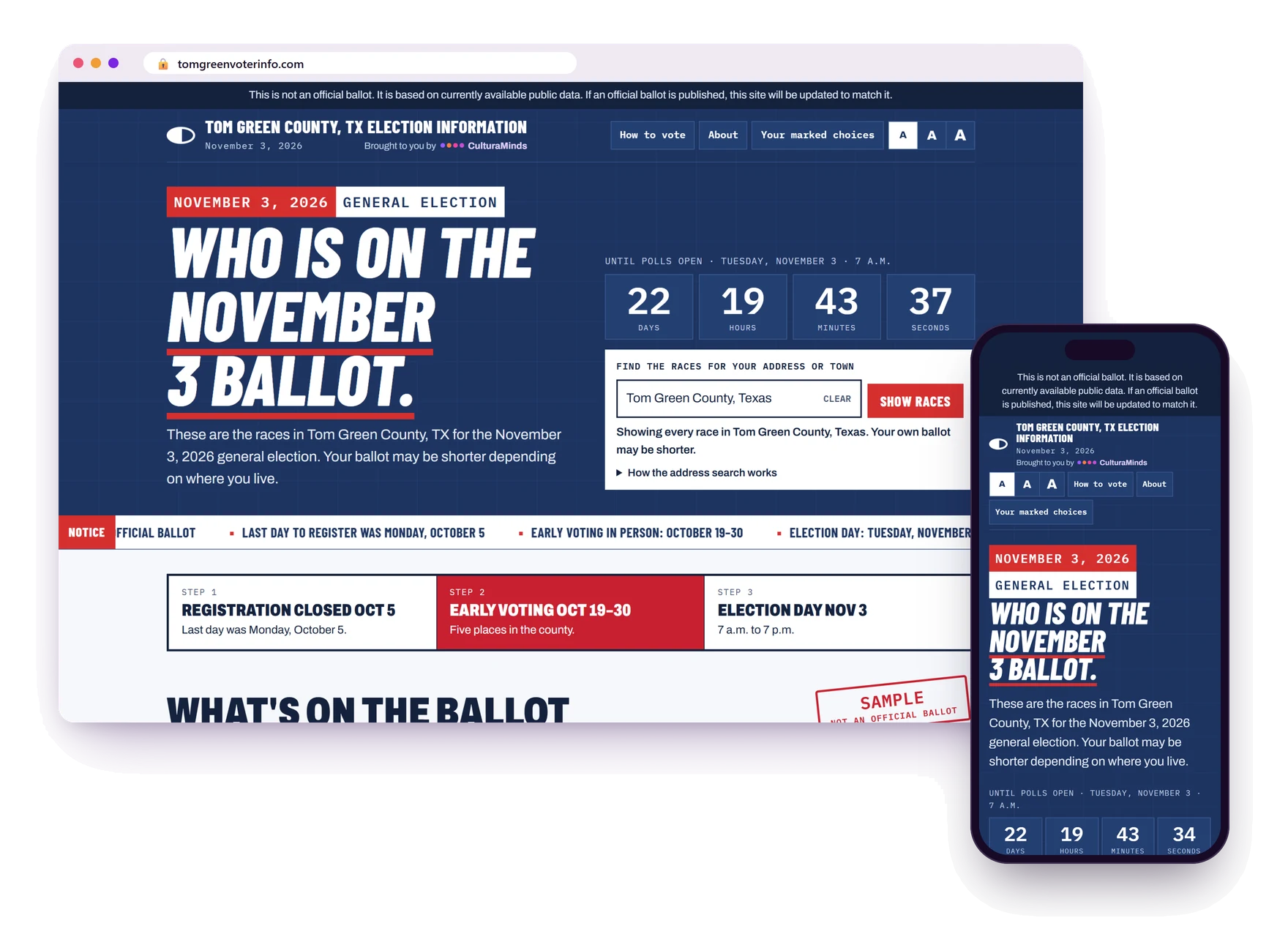
A county-wide voter guide made in two days by two people and a team of AI agents, with every fact sourced and checked.
03
Build it live
Grok Bot and Claude redesigned a volunteer’s website while we talked, each doing what it does best. Then six more things you could build.
04
Your Monday morning
Where AI saves time in economic development, chambers, tourism and local government, and a 30-day plan.
Three rules
Three rules that keep you out of trouble.
1. Protect the data
Never paste anything you wouldn’t put in a public email. Treat what you type as a public record: under the Texas Public Information Act, it may be.
2. Verify the facts
Ask for sources, then check every name, number, date and phone number yourself. AI can be confidently wrong.
3. A person decides
A named person approves before anything is published, sent or decided. Write that down in a one-page policy (below).
Starter prompts
Five prompts to try this week.
Every good prompt has the same four parts. Replace anything in [brackets] with your own details. Use a business plan for work, and never paste private or confidential information.
1. Give it a job
2. Give it your facts
3. Set limits
4. Ask what to check
1
Promote an event
Write five Facebook posts for [event] on [date] in [town]. Friendly, under 60 words each, each ending with how to take part. Flag any fact I should check before posting.
2
Summarize a meeting
Turn these notes into three lists: decisions made, action items with owner and due date, and open questions. Add nothing that isn't in the notes.

[paste notes]
3
Answer a prospect
Using only the data I paste below, draft a one-page community profile for a [industry] company considering [town]. List every number you used and where it came from. Mark anything missing as "need data".

[paste data]
4
Decode a grant
Turn these grant guidelines into a checklist of required items, deadlines and scoring criteria, with the page number for each. Then list questions I should ask the program officer.

[paste guidelines]
5
Fix your website
Read this page text from our website. List the ten questions a visitor probably has that it doesn't answer, then draft short answers for me to verify.

[paste page text]
By role
Where it saves time in your job.
Economic development
Community profiles for prospects
First drafts of RFI responses
Grant and incentive deadline tracking
Chamber & tourism
A month of event posts in minutes
A visitor FAQ assistant for your site
Member newsletters from your notes
City & county
Meeting and council-packet summaries (a person still approves official minutes)
Plain-language public notices
A services FAQ for residents
Beyond the demo
What else you could build.
Six things a small office can build itself, from today to a few weeks. The linked shapes show the level, from a simple chat to an always-on agent. Each works in ChatGPT, Claude, Gemini, Copilot or Grok, and the same three rules apply: protect the data, verify the facts, a person decides.
Chat · today
Event promo kit
One event in: a month of posts in English and Spanish, plus a flyer.
How to start
Open any AI chat and paste the prompt with your event details.
Ask for changes until it sounds like your town.
Have a fluent speaker check the Spanish before it posts.
You're the communications helper for [organization] in [town], Texas. Here are the details for [event]: [date, time, place, cost, who it's for, how to sign up].

Write:
1. Eight Facebook posts spread over the next four weeks, under 60 words each.
2. The same eight posts in Spanish.
3. Text for a one-page flyer: a headline, three short lines and the details.

Use only the facts I gave you. List anything I should check before posting.
Assistant · an afternoon
Resident FAQ assistant
Knows your hours, fees and events, and answers the everyday calls.
How to start
Put your top 20 questions and answers, fee schedule, hours and contacts in one document.
Make a saved assistant: a custom GPT in ChatGPT, a Project in Claude, a Gem in Gemini or an agent in Copilot. Paste the instructions below and attach the document.
Test it with 20 real questions. Use it inside the office first, to answer calls and emails faster, before you put it in front of the public.
You answer questions from residents and visitors about [organization] in [town], Texas. Use only the attached documents. If the answer isn't in them, say you don't know and give our main number, [phone].

Keep answers under 80 words and in plain English. Answer in Spanish if the question is in Spanish. Never give legal advice, and never guess about fees, dates or deadlines. End each answer with the name of the document you used.
Assistant · an afternoon
Council packet explainer
A 60-page packet becomes a one-page summary and a public post.
How to start
Make a saved assistant with the instructions below.
Each meeting, upload the public packet.
A person checks the summary against the packet before it’s shared. It never replaces the official minutes.
When I upload a council or commissioners court packet, write:
1. A one-page summary in plain English, by agenda item: what's being decided, the cost if listed, and the page number.
2. A public post under 120 words announcing the meeting and the three items residents will care about most.

Use only what's in the packet. Flag anything unclear instead of guessing.
Assistant · a day
Prospect response kit
Your profile, sites and incentives in one place. Drafts the first reply.
How to start
Gather your community profile, available sites and buildings, incentive programs, and workforce and utility data, with the source and date of each.
Put them in a saved assistant with the instructions below.
Keep prospect names and confidential negotiations out of it. Describe the prospect by industry instead.
You help [EDC name] respond to business prospects. Use only the attached documents. When I describe a prospect's needs, draft a reply with: a short welcome, the sites that match (size and utilities), the incentives that may apply, and workforce facts.

Cite the document and date for every number. Mark anything missing as "need data". Don't promise incentives; say they are subject to board approval.
Agent · a day or two
Small web tools
A business directory, events calendar or “who do I call” page.
How to start
Keep the data in a spreadsheet your staff already update.
Use an AI tool that builds and runs code, such as Claude Code, OpenAI Codex, Gemini CLI, Grok Build or GitHub Copilot, the same way we built today’s demo.
Run the “what a person still checks” list below before it goes live, and make sure your organization owns the domain and logins.
Build a simple, mobile-friendly web page for [organization]: a searchable [business directory / events calendar / "who do I call" guide].

Read the data from this spreadsheet: [attach or paste it]. Use our colors [colors] and our logo [link]. Make it accessible (good contrast, large tap targets, real headings) and fast, with no logins and no tracking.

Then explain how to update the spreadsheet and republish, in steps a non-programmer can follow.
Always-on agent · a few weeks
Grant deadline watcher
Checks funder pages, flags grants that fit, reminds you before deadlines.
How to start
Start simple: once a week, run the prompt below in any AI tool that can browse the web.
Once that works, an always-on agent (like our Grok Bot) can check the pages on a schedule and send you the summary.
Name one person who owns it and reviews every alert. Always confirm dates on the funder’s own page.
Here are the grant programs we track, with their web pages: [list]. Here is what we want to fund: [projects, budget range, who can apply].

For each program, tell me: open now or not, the next deadline, any match required, whether it fits one of our projects and why, and what we'd need to apply. Link the source page for every date. Say "not found" instead of guessing.
Your first 30 days
Start small, show a win, write it down.
Week 1
Pick one task
Choose one job you repeat every week. Time it by hand, then with AI.
Week 2
Write the policy
One page: what’s allowed, what never goes in, who reviews. Start from ours below.
Week 3
Build one assistant
Save your instructions and example files so the job comes out right every time.
Week 4
Show your board
Share the before and after, the hours saved, and the human review step.
AI policy starter
A one-page AI policy you can adapt.
A starting point for a small city, county, EDC, chamber or nonprofit. Replace the [brackets], keep it to one page, and have your attorney review it before adoption. This is not legal advice.
[Organization] AI Use Policy · Adopted [date] · Review by [date + 12 months]
1. Purpose
We use AI tools to save staff time on drafting, summarizing and research, while protecting public trust, private information and the accuracy of everything we publish.
2. Approved tools
Staff may use [list approved tools and plans, e.g. a business plan of ChatGPT, Claude, Copilot, Gemini or Grok]. Business or government plans that do not train on our data are required for work content. Other tools need [role]’s approval.
3. Never enter
Personal information about residents, employees or customers (Social Security numbers, financial, health or student records)
Confidential economic development negotiations or prospect identities
Passwords, security details or anything marked confidential
Information in active legal matters or personnel issues
4. A person reviews and decides
AI output is a draft. A named staff member checks every fact, number, name, date and link before anything is published, sent or used in a decision. AI is never the final decision-maker on hiring, benefits, enforcement, contracts or spending.
5. Disclosure
When AI drafts a substantial part of public material, we say so in plain language (for example: “Drafted with AI and reviewed by our staff”).
6. Records
Prompts and outputs used for public business may be public records under the Texas Public Information Act. Keep them as our records-retention schedule requires. [Confirm with the city attorney or records officer.]
7. Ownership and questions
[Role] owns this policy, keeps the approved tools list current and answers questions. Report mistakes or concerns to [contact].
Before it goes live
What a person still checks.
FactsNames, dates, hours, phone numbers and addresses
PhotosYou own them or have permission; no borrowed images
AccessibilityReadable contrast, alt text, works on a phone
VoiceSounds like your town, not like a brochure
ApprovalA named person signs off before it goes live
OwnershipYou hold the domain, the code and the logins
Case study
A county-wide voter guide in two days.
A free, nonpartisan guide to every race on the Tom Green County ballot, built by two people and a team of AI agents. Every sentence cites an official source, and a person checks it before it goes live. The same engine now runs a guide for Crockett County, population about 2,800.
Careful writing, long documents and building working software. claude.ai
ChatGPT
The best-known all-rounder: writing, images, voice and custom GPTs. chatgpt.com
Grok
Real-time research across the web and X, fast drafting. grok.com
Copilot
Inside Outlook, Word, Excel and Teams for Microsoft 365 offices. copilot.microsoft.com
Gemini
Inside Gmail, Docs and Sheets for Google Workspace offices. gemini.google.com
Free tiers are fine for learning. Paid plans vary based on usage and features; check current pricing. Use a business plan for anything work-related. The live redesign from the session will be posted here if the volunteer agrees.
Want help in your community?
Let’s link what’s next.
CulturaMinds runs hands-on AI workshops and builds assistants and always-on agents for communities and small organizations across Texas.